15% OFF
Pick up from our office
1-3 business days
2-5 business days
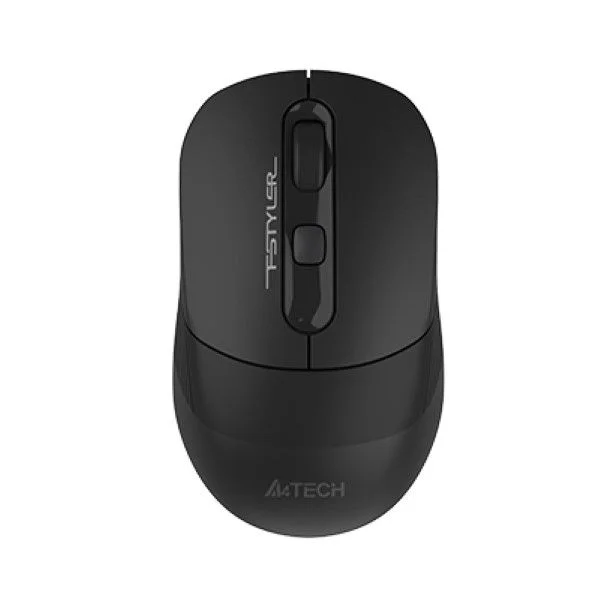
Experience unparalleled productivity and seamless connectivity with the A4TECH FSTYLER FB10CS Silent Multimode Rechargeable Wireless Mouse, now available at the best price in Bangladesh! This versatile mouse is engineered for the modern user who demands flexibility, comfort, and a silent working environment. Whether you're navigating complex spreadsheets, designing intricate graphics, or simply browsing the web, the FB10CS offers a superior user experience with its dual-mode connectivity, silent clicks, and ergonomic design.
Get the original A4TECH FSTYLER FB10CS Silent Multimode Rechargeable Wireless Mouse for just ৳1700.00 BDT exclusively at BDSHOP.COM. We guarantee authentic products, exceptional customer service, and fast delivery across Bangladesh, including Dhaka, Chittagong, Sylhet, and all other districts. Upgrade your workspace today and enjoy a truly uninterrupted workflow.
The A4TECH FSTYLER FB10CS is more than just a mouse; it's a productivity powerhouse designed to adapt to your dynamic lifestyle. Its multimode capability allows you to switch effortlessly between Bluetooth and 2.4GHz wireless connections, making it compatible with a wide array of devices from laptops and desktops to tablets and smart TVs. The silent click feature ensures a disturbance-free environment, perfect for quiet offices, libraries, or late-night work sessions at home. With its built-in rechargeable battery and adjustable DPI, the FB10CS is crafted for efficiency and convenience, making it a top choice for a wireless mouse in Bangladesh.
The A4TECH FB10CS offers unmatched flexibility with its dual wireless connectivity options. Seamlessly switch between a stable 2.4GHz wireless connection via the included USB nano receiver and two separate Bluetooth 5.0 connections. This "Auto-Channel Sort" feature ensures a strong, reliable connection for optimal performance. This versatility makes it ideal for users who frequently switch between different devices.
Imagine controlling your laptop, tablet, and a second PC with a single mouse! The FB10CS makes this a reality by allowing you to connect with up to three devices at the same time. One connection utilizes the 2.4GHz USB receiver, while the other two are managed via Bluetooth. Effortlessly switch between devices with a dedicated button, boosting your multitasking capabilities.
One of the standout features of the FB10CS is its silent click technology. Say goodbye to distracting click noises that can interrupt your focus or disturb colleagues and family. The FB10CS provides a soft, tactile click feedback without the audible sound, allowing you to concentrate fully on your tasks and maintain a peaceful work environment. This silent mouse feature is highly sought after in the Bangladesh market.
Forget about constantly replacing batteries. The A4TECH FB10CS features a built-in rechargeable lithium battery, making it an eco-friendly and cost-effective choice. It charges conveniently via a universal Type-C USB connector, which is included in the package. A full charge takes approximately 2.5 hours and can provide an impressive battery life of up to 45 days, depending on usage.
Customize your cursor speed and sensitivity to match your workflow with the adjustable DPI (Dots Per Inch) settings. The FB10CS offers three levels of precision: 1200, 1600, and 2000 DPI. Easily switch between these settings on the fly to achieve optimal control, whether you're performing precise editing tasks or navigating quickly across large screens.
Designed for comfort during prolonged use, the FB10CS incorporates an anti-slippery belt design on its sides. This textured grip provides enhanced control and prevents accidental slips, ensuring an ergonomic and comfortable fit for your hand. This thoughtful design minimizes hand fatigue, making it perfect for long working hours in Bangladesh's bustling professional environment.
Unleash a new level of efficiency with A4TECH's 16-in-One gesture technology. By installing the optional software, you can program 16 customizable hotkey commands to various mouse gestures. Perform complex actions like launching applications, media controls, or navigating web pages with simple mouse movements, streamlining your workflow significantly.
To maximize battery life and ensure longevity, the FB10CS is equipped with a convenient On/Off power switch at the bottom. This allows you to completely power down the mouse when not in use, preventing unnecessary battery drain and making it a perfect on-the-go companion for travelers and remote workers across Bangladesh.
Enjoy freedom of movement with a reliable wireless range of up to 10 meters (33 feet) for both 2.4GHz and Bluetooth connections. The FB10CS is widely compatible with various operating systems, including Windows 7/8/8.1/10/11, macOS, Android, and Linux, ensuring it integrates seamlessly into almost any setup.
| Feature | Specification |
|---|---|
| Model | FB10CS |
| Brand | A4Tech |
| Connectivity Type | Wireless (Bluetooth 5.0 + 2.4GHz) |
| Wireless Range | Up to 10 meters (33 feet) |
| Sensor Type | Optical |
| DPI (Resolution) | 1200 / 1600 / 2000 (Adjustable) |
| Polling Rate | 125 Hz |
| Number of Buttons | 5 (Left, Right, Scroll Wheel Click, Forward, Backward) |
| Click Life | 5 Million Clicks |
| Silent Clicks | Yes |
| Multi-Device Support | Yes, up to 3 devices (1x 2.4GHz, 2x Bluetooth) |
| Battery Type | Built-in Rechargeable Lithium Battery |
| Battery Capacity | 300 mAh |
| Charging Port | USB Type-C |
| Charging Time | Approx. 2.5 hours |
| Battery Life | Up to 45 days (depending on usage) |
| Ergonomics | Right-handed, Anti-Slippery Side Grip |
| Dimensions (L x W x H) | 105 x 70 x 42 mm |
| Weight | Approx. 78g |
| Color | Black |
| Compatibility | Windows 7/8/8.1/10/11, macOS, Android, Linux |
| Included Accessories | Mouse, USB Type-C Charging Cable, USB Nano Receiver, User Manual |
| Warranty | 1-Year Official Warranty |
| Price in Bangladesh | ৳1700.00 BDT |
Connect the included USB Type-C cable to the charging port on the front of the mouse and the other end to a USB power source (e.g., computer USB port, wall adapter). The LED indicator will light up during charging and turn off when fully charged (approx. 2.5 hours).
Plug the USB nano receiver into an available USB port on your computer. Turn on the mouse using the On/Off switch at the bottom. The mouse will automatically connect to the receiver. Ensure the mode switch on the bottom is set to the 2.4G icon.
Press the DPI button (usually located behind the scroll wheel) to cycle through the 1200, 1600, and 2000 DPI settings, instantly changing your cursor speed.
Download and install the "Office Shuttle Software" from the A4TECH official website. This software allows you to customize the 16 gesture commands and assign various functions to them, enhancing your control and efficiency.
Join Our Official Facebook Group BD SHOP CLUB for exclusive offers and updates!
We typically reply within a few minutes