11% OFF
Pick up from our office
1-3 business days
2-5 business days
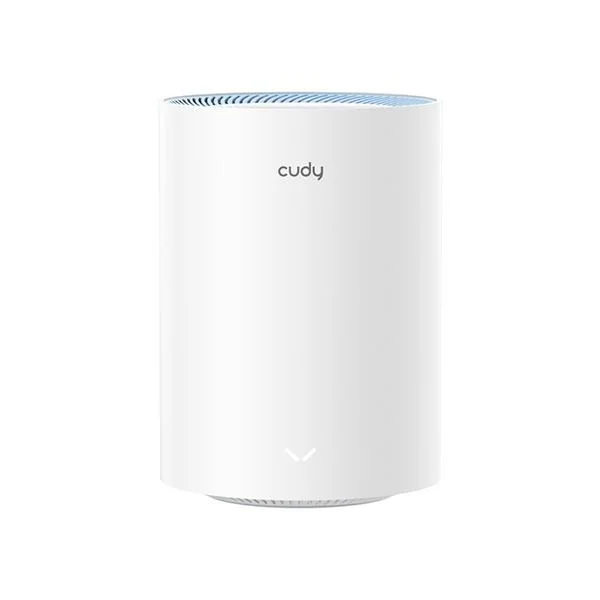
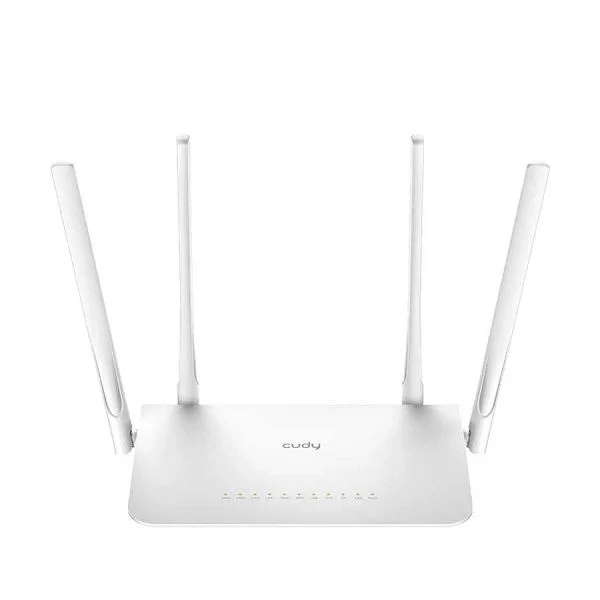
Experience blazing-fast, reliable internet connectivity across your entire home or office with the Cudy WR1300 AC1200 Mbps Gigabit Dual-Band Wi-Fi 5 Router. Engineered for modern internet demands, this powerful router delivers exceptional performance for streaming 4K videos, online gaming, video conferencing, and seamless browsing on multiple devices simultaneously. Now available at an unbeatable price in Bangladesh, the Cudy WR1300 is your ultimate solution for a stable and high-speed Wi-Fi network.
The Cudy WR1300 is designed to provide comprehensive Wi-Fi coverage, eliminating dead zones and ensuring every corner of your space enjoys robust connectivity. With its advanced Wi-Fi 5 (802.11ac) standard, dual-band technology, and full Gigabit Ethernet ports, it's the perfect upgrade for anyone looking to maximize their internet speed and efficiency. Get the original Cudy WR1300 router at the most competitive price in Bangladesh exclusively at BDSHOP.COM, where quality meets affordability and exceptional customer service.
The Cudy WR1300 stands out in the Bangladesh market for its blend of performance, features, and affordability. Whether you're a heavy internet user, a gamer, or simply need reliable Wi-Fi for your smart home devices, this router is built to impress. Its dual-band capability ensures optimal performance for all your devices, intelligently routing traffic to the best available frequency band.
The Cudy WR1300 is packed with features designed to deliver a superior networking experience. Here’s why it’s becoming a popular choice for homes and small offices across Bangladesh:
In today's connected world, a reliable and fast Wi-Fi router is indispensable. The Cudy WR1300 offers an outstanding balance of performance, features, and value, making it an excellent choice for a wide range of users in Bangladesh. Whether you're upgrading from an older router or setting up a new network, the WR1300 provides:
Here’s a detailed look at the technical specifications of the Cudy WR1300 router:
| Feature | Specification |
|---|---|
| Product Name | Cudy WR1300 AC1200 Mbps Gigabit Dual-Band Wi-Fi 5 Router |
| Wireless Standard | IEEE 802.11ac/n/a 5 GHz, IEEE 802.11n/b/g 2.4 GHz |
| Wi-Fi Speeds | AC1200 (867 Mbps on 5 GHz, 300 Mbps on 2.4 GHz) |
| Frequency | 2.4 GHz & 5 GHz (Dual-Band) |
| Antennas | 4 × Fixed Omni-Directional Antennas (5 dBi Gain each) |
| Ethernet Ports | 1 × 10/100/1000 Mbps Gigabit WAN Port 4 × 10/100/1000 Mbps Gigabit LAN Ports |
| Processor | Dual-Core CPU |
| Memory | 128 MB DDR3 RAM, 16 MB Flash |
| Wireless Functions | Enable/Disable Wireless Radio, WMM, Wireless Statistics, MU-MIMO, Beamforming, Guest Network |
| Wireless Security | WEP, WPA/WPA2, WPA-PSK/WPA2-PSK encryption |
| Buttons | WPS Button, Reset Button |
| WAN Type | Dynamic IP, Static IP, PPPoE, PPTP, L2TP |
| Management | Access Control, Local Management, Remote Management |
| DHCP | Server, DHCP Client List, Address Reservation |
| Port Forwarding | Virtual Server, Port Triggering, UPnP, DMZ |
| Dynamic DNS | Supported (No-IP, DynDNS, Cudy) |
| Firewall Security | SPI Firewall, IP and MAC Address Binding |
| Protocols | IPv4, IPv6 |
| Guest Network | 1 x 2.4 GHz Guest Network, 1 x 5 GHz Guest Network |
| Parental Control | Yes |
| Quality of Service (QoS) | WMM, Bandwidth Control |
| Operating System Support | Microsoft Windows 8 SE/ NT/ 2000/ XP/ Vista/ 7/ 8/ 8.1/ 10/11, MAC OS, NetWare, UNIX or Linux |
| Power Supply | 12 V / 1 A External Power Adapter |
| Power Consumption | ~8W (Max) |
| Dimensions (W x D x H) | 204.8 x 137.5 x 38.3 mm |
| Weight | Approximately 350g |
| Operating Temperature | 0℃~40℃ (32℉~104℉) |
| Storage Temperature | -40℃~70℃ (-40℉~158℉) |
| Operating Humidity | 10%~90% non-condensing |
| Storage Humidity | 5%~90% non-condensing |
| Color | White |
Setting up your Cudy WR1300 router is straightforward and quick. Simply connect it to your modem, power it on, and follow the intuitive instructions via the web-based interface. You’ll be up and running with a high-speed Wi-Fi network in minutes. The user-friendly interface also makes it easy to manage your network settings, set up parental controls, configure guest networks, and prioritize devices with QoS.
We typically reply within a few minutes