CUDY WR1300E AC1200 Gigabit Dual Band Wi-Fi Router Price In Bangladesh
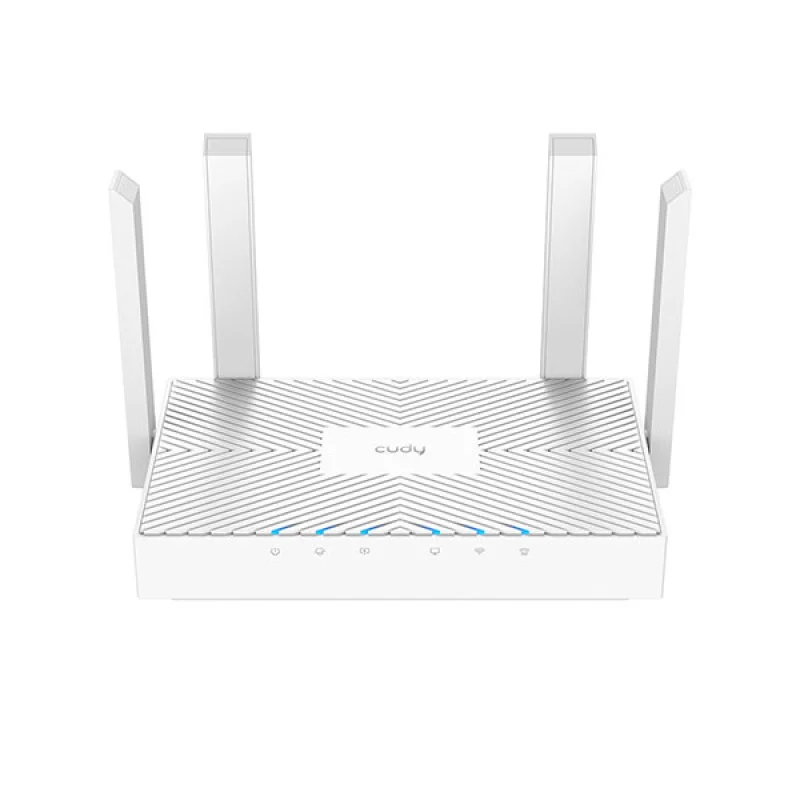
The CUDY WR1300E AC1200 Gigabit Dual Band Wi-Fi Router is now available in Bangladesh, offering a powerful and reliable internet solution for homes and small offices. Priced competitively at ৳3300.00 BDT, this router delivers lightning-fast AC1200 speeds, dual-band connectivity, and full Gigabit Ethernet ports, making it an excellent choice for users seeking a high-performance network experience. Whether you're streaming 4K videos, engaging in online gaming, or managing multiple smart home devices, the CUDY WR1300E ensures a smooth and stable connection across all your devices.
Finding the best Wi-Fi router in Bangladesh that balances performance and affordability can be challenging, but the CUDY WR1300E stands out. Its advanced features, including a powerful dual-core CPU and robust antenna design, guarantee extensive coverage and consistent speeds. For those searching for a reliable AC1200 Gigabit router price in Bangladesh, the CUDY WR1300E offers exceptional value, providing a future-proof networking solution that meets the demands of modern internet usage.
Overview of the CUDY WR1300E AC1200 Gigabit Dual Band Wi-Fi Router
The CUDY WR1300E is engineered to elevate your internet experience. As an AC1200 router, it combines the 2.4 GHz band (offering up to 300 Mbps) for longer range and better wall penetration, with the 5 GHz band (delivering up to 867 Mbps) for high-speed, low-latency connections ideal for demanding tasks. This dual-band capability allows you to dedicate high-bandwidth activities to the faster 5 GHz band while maintaining stable connections for everyday browsing on the 2.4 GHz band, effectively minimizing interference and maximizing throughput. This makes the CUDY WR1300E AC1200 Gigabit Dual Band Wi-Fi Router a top contender for users looking for a high-speed router in Bangladesh.
Equipped with full Gigabit WAN and LAN ports, the CUDY WR1300E ensures that your wired devices, such as PCs, smart TVs, and gaming consoles, can benefit from the fastest possible internet speeds, up to 1000 Mbps. This is crucial for users with high-speed fiber optic connections common in Bangladesh, ensuring no bottleneck between your modem and your devices. With its sleek design and powerful internal hardware, including a dual-core CPU and ample memory, this router is built for stability and efficiency, capable of handling numerous connected devices simultaneously without performance degradation.
Key Features of CUDY WR1300E
The CUDY WR1300E AC1200 Gigabit Dual Band Wi-Fi Router comes packed with features designed to provide a superior networking experience. Here’s a closer look at what makes it an excellent choice for your home or office in Bangladesh:
Dual-Band AC1200 Wi-Fi: Experience combined wireless speeds of up to 1200 Mbps (300 Mbps on 2.4 GHz and 867 Mbps on 5 GHz). This allows for smoother 4K streaming, lag-free online gaming, and faster downloads across multiple devices. The 5 GHz band is perfect for bandwidth-intensive tasks, while the 2.4 GHz band provides broader coverage for general internet use.
Full Gigabit Ethernet Ports: Featuring one Gigabit WAN port and two Gigabit LAN ports, the WR1300E ensures blazing-fast wired connections. This is essential for maximizing the speed of your fiber internet connection and for connecting high-demand devices like gaming PCs, NAS drives, and smart TVs directly to the network without any speed compromise.
Powerful Dual-Core CPU: At its heart, a robust dual-core processor efficiently manages multiple tasks and processes data streams, ensuring stable performance even under heavy network load. This powerful CPU contributes to a more responsive and reliable Wi-Fi experience.
High-Gain Omni-Directional Antennas: Four fixed external 5dBi omni-directional antennas provide extensive Wi-Fi coverage and strong signal penetration throughout your home or office. These antennas are meticulously designed to reduce dead zones and deliver consistent, reliable connectivity to every corner.
Enhanced Wireless Security: Protect your network with advanced WPA/WPA2 and WPA-PSK/WPA2-PSK encryption standards. The router also supports Guest Network functionality, allowing visitors to access the internet without compromising your main network's security or resources.
Advanced Software Features: The CUDY WR1300E offers a suite of powerful software functionalities, including Dynamic DNS (compatible with 15+ providers), Port Forwarding, Port Triggering, UPnP, and DMZ. It also supports VPN Server and Client (PPTP/L2TP) for secure remote access and private browsing.
Parental Control: Easily manage and monitor internet access for children or specific users. Implement domain, IP, or MAC filtering to block unwanted content or restrict access during certain hours, ensuring a safer online environment.
Easy Setup and Management: With a user-friendly web interface and a convenient WPS (Wi-Fi Protected Setup) button, setting up your network is quick and hassle-free. The CUDY WR1300E is designed for easy installation, allowing you to get online in minutes.
Benefits of Choosing CUDY WR1300E for Your Home or Office in Bangladesh
Investing in the CUDY WR1300E AC1200 Gigabit Dual Band Wi-Fi Router brings numerous advantages to users in Bangladesh. Its combination of speed, coverage, and security makes it an ideal networking solution:
Blazing-Fast Speeds for All Activities: With AC1200 dual-band Wi-Fi and Gigabit ports, you can enjoy seamless 4K streaming on platforms like Netflix or YouTube, experience lag-free online gaming with popular titles, and download large files in minutes. This router ensures your internet speed is never wasted.
Wider and More Reliable Coverage: The four high-gain antennas work together to eliminate Wi-Fi dead zones, providing a strong and stable signal throughout your entire home or office. This means you can enjoy consistent connectivity from your living room to your bedroom, or across multiple office spaces.
Connect More Devices Simultaneously: The powerful dual-core CPU and ample memory allow the CUDY WR1300E to efficiently handle multiple devices connected at once, whether it's smartphones, laptops, smart TVs, tablets, or IoT devices. Everyone in the household or office can enjoy their online activities without slowdowns.
Enhanced Network Security and Control: Protect your family or business with robust security features. Parental controls give you peace of mind, while guest networks ensure your main network remains private and secure from visitors. VPN support adds an extra layer of privacy and flexibility.
Future-Proof Your Network: With full Gigabit ports and AC1200 Wi-Fi, the CUDY WR1300E is ready for the fastest internet plans available today and in the near future in Bangladesh. It ensures that your router won't be the bottleneck as internet speeds continue to increase.
Cost-Effective Performance: At ৳3300.00 BDT, the CUDY WR1300E offers premium features and performance typically found in higher-priced routers, making it one of the best value-for-money AC1200 Gigabit routers available in the Bangladesh market.
Usage Instructions and Setup Guide
Setting up your CUDY WR1300E AC1200 Gigabit Dual Band Wi-Fi Router is straightforward. Follow these simple steps to get your network up and running quickly:
Unpack and Connect:
Unbox the router, power adapter, and Ethernet cable.
Connect the power adapter to the router's power port and plug it into an electrical outlet.
Connect one end of the provided RJ45 Ethernet cable to your modem's LAN port and the other end to the CUDY WR1300E's WAN port (usually colored blue).
Power On:
Wait for the router to power on completely. The LED indicators on the front panel will light up, indicating that the router is ready.
Connect to the Router:
Wireless Connection: On your computer or mobile device, search for available Wi-Fi networks. You will find two networks, typically named "CUDY_XXXX_2.4G" and "CUDY_XXXX_5G" (where XXXX is the last four digits of the router's MAC address). Select one and connect. The default Wi-Fi password is usually printed on a sticker at the bottom of the router.
Wired Connection: Alternatively, connect your computer directly to one of the router's LAN ports (yellow ports) using an Ethernet cable.
Access the Web Interface:
Open a web browser (Firefox 12.0+, Chrome 20.0+, Safari 4.0+ recommended) and type the default IP address (usually 192.168.10.1) into the address bar. Press Enter.
You will be prompted to create a new login password for the router's management interface.
Follow Quick Setup Wizard:
The router's web interface will guide you through a quick setup wizard. This wizard will help you configure your internet connection type (Dynamic IP, Static IP, or PPPoE, depending on your ISP in Bangladesh), set up your Wi-Fi network name (SSID), and create a strong password for both 2.4 GHz and 5 GHz bands.
Enjoy Your New Network:
Once the setup is complete, your CUDY WR1300E router will be fully operational, providing high-speed internet access.
For advanced settings like Parental Control, Guest Network, or VPN, navigate through the router's web interface.
CUDY WR1300E AC1200 Gigabit Dual Band Wi-Fi Router Specifications
Dynamic DNS: Compatible with 15+ more DDNS providers
Guest Network:
2.4 GHz guest network – 1
5 GHz guest network – 1
NAT: Port Forwarding, Port Triggering, UPnP, DMZ
VPN Server and Client: PPTP/L2TP
Others
System Requirements:
Windows, MAC OS, NetWare, UNIX, or Linux
Firefox 12.0+, Chrome 20.0+, Safari 4.0+, or other Javascript-enabled browser
A fiber/cable/DSL Modem, or other devices providing wired internet
Subscription with an internet service provider for internet access
Operating Temperature: 0°C~40°C (32°F~104°F)
Storage Temperature: -40°C~70°C (-40°F~158°F)
Operating Humidity: 10%~90% non-condensing
Storage Humidity: 5%~90% non-condensing
Package Content
1× CUDY WR1300E AC1200 Wi-Fi Router
1× Power Adapter (12V/1A)
1× RJ45 Ethernet Cable (1 meter)
1× Quick Installation Guide
Availability and Price in Bangladesh
The CUDY WR1300E AC1200 Gigabit Dual Band Wi-Fi Router is readily available across Bangladesh, making it easy to upgrade your home or office network. You can find this high-performance router at leading computer and electronics stores, as well as reputable online retailers throughout the country. For those looking for the CUDY WR1300E price in Bangladesh, it is currently offered at an attractive price, positioning it as an excellent value proposition in the AC1200 Gigabit router segment.
When searching for 'CUDY WR1300E in Bangladesh' or 'AC1200 Gigabit router near me', you'll find numerous options for purchase. Many online platforms offer convenient delivery in Bangladesh, often with cash-on-delivery or secure online payment methods. Ensure you purchase from authorized dealers to receive authentic products and reliable warranty support. This router is an ideal choice for anyone in Bangladesh seeking a fast, stable, and secure internet connection for all their digital needs.
Disclaimer:
Product descriptions and technical specifications on this website may be generated with the assistance of AI and are provided for reference purposes only. Actual product features, performance, and specifications may vary — please verify all details directly with the official manufacturer's website before purchase. We do not manufacture; we are a seller and are not responsible for discrepancies in product features, behavior, or specifications.