5% OFF
Pick up from our office
1-3 business days
2-5 business days
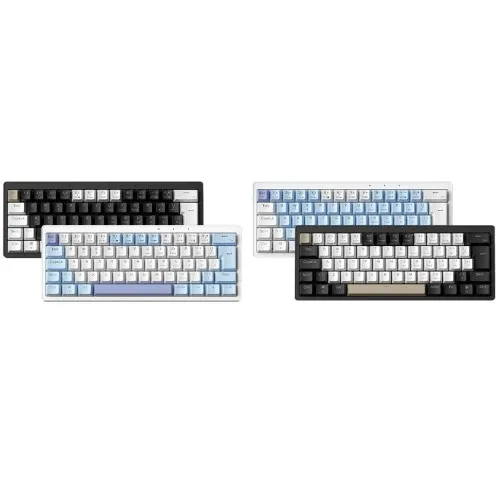
Elevate your typing and gaming experience to an extraordinary level with the FURYCUBE E68 Tri-Mode Mechanical Keyboard, now readily available across Bangladesh. Engineered for ultimate versatility, robust performance, and stunning aesthetics, the FURYCUBE E68 offers a seamless blend of cutting-edge technology and premium build quality. Whether you're a professional coder, a dedicated gamer, or simply someone who appreciates a superior typing feel, this hot-swappable, RGB-backlit mechanical keyboard is designed to exceed your expectations. Discover the best mechanical keyboard experience with the FURYCUBE E68, offering competitive pricing and widespread availability throughout the Bangladesh market.
The FURYCUBE E68 isn't just a keyboard; it's a statement. Featuring a compact 68-key layout (65% form factor), it strikes the perfect balance between functionality and desk space efficiency. Its tri-mode connectivity ensures you're always connected, whether through ultra-fast 2.4GHz wireless, stable Bluetooth 5.0, or reliable USB-C wired connection. Coupled with vibrant per-key RGB lighting and hot-swappable switch sockets, the FURYCUBE E68 offers unparalleled customization and a premium feel that is hard to match. Find the FURYCUBE E68 Tri-Mode Mechanical Keyboard price in Bangladesh and experience the difference.
The FURYCUBE E68 provides three robust connection options to suit any scenario.
This versatility makes the FURYCUBE E68 an ideal choice for anyone looking for a mechanical keyboard in Bangladesh that adapts to their multi-device lifestyle.
The FURYCUBE E68 comes equipped with 5-pin hot-swappable sockets, allowing you to easily change out switches without any soldering. This means you can experiment with different switch types (linear, tactile, clicky) to find your perfect typing or gaming feel. The keyboard typically comes with pre-installed Gateron Pro Yellow switches, renowned for their smooth linear travel and satisfying 50g actuation force. This feature ensures the FURYCUBE E68 will remain your preferred keyboard for years to come, adapting to your evolving preferences.
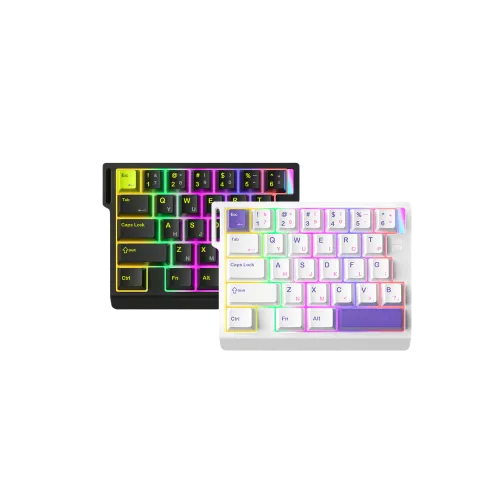
Immerse yourself in a world of color with the FURYCUBE E68's per-key RGB backlighting. Choose from over 18 dazzling lighting modes and millions of colors to perfectly match your setup, mood, or game. Adjust brightness and speed directly from the keyboard or through dedicated software for deeper customization. This dynamic lighting not only enhances aesthetics but also improves visibility in low-light conditions.
Crafted with a sturdy ABS plastic frame and a steel mounting plate, the FURYCUBE E68 offers exceptional durability and a satisfying weight that prevents slippage during intense use. The double-shot PBT keycaps ensure legends won't fade over time, providing a premium feel and superior resistance to oils and shine. The OEM profile keycaps and two-stage adjustable feet offer ergonomic comfort, reducing strain during long typing sessions.
Equipped with a high-capacity 3000mAh rechargeable lithium-ion battery, the FURYCUBE E68 ensures extended wireless usage. Enjoy up to 70 hours of continuous typing with RGB lighting off, or approximately 20-25 hours with moderate RGB brightness. The intelligent power management system helps conserve battery life, making it perfect for travel or extended work sessions without constant recharging.
| Feature | Specification |
|---|---|
| Model | FURYCUBE E68 |
| Layout | 68-Key (65% Compact) |
| Connectivity | Tri-Mode: USB-C Wired, 2.4GHz Wireless, Bluetooth 5.0 |
| Switches | Gateron Pro Yellow (Linear, 50g actuation) |
| Hot-Swappable | Yes, 5-pin compatible |
| Keycaps | Double-Shot PBT, OEM Profile |
| Backlighting | Per-Key RGB (18+ modes) |
| Battery Capacity | 3000mAh Li-ion Rechargeable |
| Battery Life | Up to 70 hours (RGB off), 20-25 hours (RGB on) |
| Polling Rate | 1000Hz (Wired/2.4GHz), 125Hz (Bluetooth) |
| N-Key Rollover | Full NKRO (Wired/2.4GHz), 6-Key Rollover (Bluetooth) |
| Case Material | ABS Plastic |
| Plate Material | Steel |
| Stabilizers | Plate-mounted, pre-lubed |
| Dimensions (L x W x H) | 315 mm x 105 mm x 38 mm |
| Weight | Approximately 780g |
| Compatibility | Windows, macOS, Linux, Android, iOS |
| Cable Length | 1.8 meters (Detachable USB-C to USB-A) |
| Software Support | Yes (for macro programming, RGB customization) |
The compact 65% layout provides all essential keys without cluttering your desk. The tactile feedback of mechanical switches and the hot-swappable feature allow you to tailor the typing experience for maximum efficiency in your daily tasks.
With 2.4GHz wireless and wired 1000Hz polling rates, the FURYCUBE E68 ensures ultra-low latency, crucial for competitive gaming. Full N-Key Rollover means every keystroke registers, no matter how fast you type, giving you an edge in any game.
From hot-swapping switches to customizing RGB lighting and programming macros via software, the FURYCUBE E68 offers a level of personalization that few keyboards can match. Make it truly yours.
Its compact size and tri-mode connectivity make it an excellent companion for both desktop setups and on-the-go use with laptops, tablets, and even smartphones. The long battery life further enhances its portability.
Use the physical switch on the back of the keyboard to select between "OFF", "2.4G", and "BT" modes. In "BT" mode, press Fn + Q/W/E to switch between paired Bluetooth devices.
We typically reply within a few minutes