33% OFF
Low Stock
Pick up from our office
1-3 business days
2-5 business days
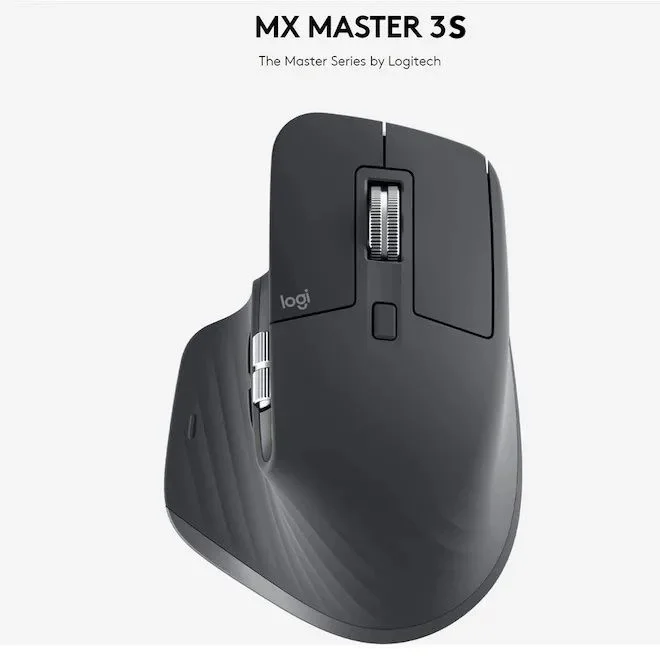
Step into a new era of precision, performance, and quiet computing with the Logitech MX Master 3s Advanced Wireless Mouse, now readily available across Bangladesh. Engineered for power users, creatives, and professionals who demand the absolute best, the MX Master 3s combines cutting-edge technology with an ergonomic design to transform your workflow. Whether you're coding, designing, editing videos, or simply navigating complex spreadsheets, this advanced wireless mouse is your perfect companion. Get the original Logitech MX Master 3s at the most competitive price in Bangladesh, exclusively at BDSHOP.COM, and experience unparalleled quality backed by reliable customer service.
Priced at ৳15000.00 BDT, the MX Master 3s isn't just a mouse; it's an investment in your productivity and comfort. It's designed to seamlessly integrate into your multi-device, multi-OS setup, offering features like ultra-fast MagSpeed scrolling, whisper-quiet clicks, and an 8000 DPI sensor that tracks on virtually any surface – even glass. Elevate your digital experience and discover why the Logitech MX Master 3s is considered the gold standard for advanced wireless mice in the Bangladesh market.
Experience precision like never before with the upgraded 8000 DPI optical sensor of the MX Master 3s. This advanced sensor allows you to work flawlessly on virtually any surface, including glass tables (minimum 4mm thickness), which is a game-changer for many workspaces in Bangladesh. With customizable sensitivity via the Logi Options+ software, you can fine-tune your tracking speed and accuracy to perfectly match your workflow and monitor resolution, ensuring pixel-perfect control for graphic designers, video editors, and data analysts.
The Logitech MX Master 3s introduces Quiet Clicks, an innovation designed to reduce click noise by 90% compared to the MX Master 3, while retaining that satisfying tactile feedback you expect from a premium mouse. This feature is invaluable for shared office spaces, quiet libraries, or late-night work sessions at home, allowing you to maintain focus without disturbing others or being distracted by incessant clicking. It's perfect for anyone seeking a more serene computing experience in Bangladesh.
Reinvent your scrolling experience with the MagSpeed Electromagnetic Scroll Wheel. This remarkable technology offers two modes: a super-fast, free-spinning mode that can scroll through 1,000 lines in just one second, and a precise, click-to-click mode for detailed navigation. It’s 90% faster and 87% more precise than a standard mouse scroll wheel, making it ideal for quickly reviewing documents, browsing lengthy web pages, or navigating extensive timelines in creative software. Best of all, it operates with near-silent efficiency, adding to the MX Master 3s's quiet operation.
The MX Master 3s is meticulously crafted to fit the contours of your hand, promoting a more natural wrist posture and reducing strain during long hours of use. Its sculpted silhouette, along with optimally placed thumb controls – including a dedicated thumb wheel for horizontal scrolling and gesture buttons – ensures intuitive control and exceptional comfort. This ergonomic design is a significant advantage for professionals in Bangladesh who spend extended periods working on their computers.
Unleash your productivity with Logitech FLOW, a feature that allows you to seamlessly control multiple computers or laptops with a single MX Master 3s mouse. Effortlessly move your cursor across up to three different Windows or macOS devices, and even transfer text, images, and files between them with a simple copy-paste. This functionality is a game-changer for multi-device users, streamlining workflows and eliminating the need for multiple peripherals.
The MX Master 3s offers versatile connectivity options, allowing you to connect with up to three devices simultaneously via Bluetooth Low Energy or the included Logi Bolt USB receiver. It supports a wide range of operating systems, including Windows 10/11 or later, macOS 10.15 or later, Chrome OS, Linux, iPadOS 14 or later, and even Android 8.0 or later. This broad compatibility makes it an exceptionally flexible tool for diverse computing environments found throughout Bangladesh.
Power through your tasks with confidence, knowing the MX Master 3s boasts an impressive battery life of up to 70 days on a full charge. When you do need to recharge, the included USB-C charging cable ensures quick top-ups. A mere 1-minute quick charge provides up to 3 hours of use, so you're never left stranded. This exceptional battery performance and quick charging capability make it an ideal wireless mouse for on-the-go professionals in Bangladesh.
Take full control of your workflow with the powerful Logi Options+ software. Customize every button on your MX Master 3s, assign application-specific profiles, and optimize your experience for your favorite apps like Adobe Photoshop, Adobe Premiere Pro, Final Cut Pro, Google Chrome, Microsoft Word, Excel, PowerPoint, Zoom, and Safari. These predefined customizations help you work faster and more efficiently, tailored precisely to your needs, whether you're a creative professional or a business user.
| Feature | Specification |
|---|---|
| Product Name | Logitech MX Master 3s Advanced Wireless Mouse |
| Model Number | 910-006557 (Graphite), 910-006567 (Pale Gray), 910-006568 (Black) |
| Sensor Technology | Darkfield high precision optical sensor |
| DPI Range | 200 DPI to 8000 DPI (adjustable in 50 DPI increments) |
| Buttons | 7 buttons (Left/Right-click, Back/Forward, App-Switch, Wheel mode-shift, Middle click). Thumb wheel. Gesture button. |
| Scroll Wheel | MagSpeed Electromagnetic scrolling, 1000 lines/second, Auto-shift mode |
| Quiet Click | Yes (90% less click noise compared to MX Master 3) |
| Connectivity | Bluetooth Low Energy, Logi Bolt USB Receiver |
| Wireless Range | 10 meters (33 feet) |
| Battery Type | Rechargeable Li-Po (500 mAh) battery |
| Battery Life | Up to 70 days on a full charge; 3 hours of use from 1-minute quick charge |
| Charging Port | USB-C |
| Mouse Dimensions (H x W x D) | 124.9 mm x 84.3 mm x 51 mm |
| Mouse Weight | 141 grams |
| Logi Bolt Receiver Dimensions (H x W x D) | 18.4 mm x 14.4 mm x 6.6 mm |
| Logi Bolt Receiver Weight | 2 grams |
| Compatibility | Windows 10/11 or later, macOS 10.15 or later, Linux, Chrome OS, iPadOS 14 or later, Android 8.0 or later |
| Software | Logi Options+ (available for Windows and macOS) |
| Colors Available | Graphite, Pale Gray, Black |
| Warranty | 1-Year Logitech International Warranty |
| Package Contents | 1 x Logitech MX Master 3s Advanced Wireless Mouse, 1 x Logi Bolt USB Receiver, 1 x USB-C charging cable (USB-A to USB-C), 1 x User documentation |
For professionals and power users across Bangladesh, the Logitech MX Master 3s represents the pinnacle of wireless mouse technology. Its blend of ergonomic comfort, advanced tracking, silent operation, and seamless multi-device control translates directly into increased productivity and reduced fatigue. Whether you're a software developer in Dhaka, a graphic designer in Chittagong, or a content creator in Sylhet, the MX Master 3s offers the precision and efficiency you need to excel. It’s a future-proof investment that enhances every aspect of your digital interaction, making it the best wireless mouse for professionals in Bangladesh.
To unlock the full potential of your MX Master 3s, download and install the Logi Options+ software from the official Logitech website. This intuitive application allows you to:
When the battery indicator light turns red, it's time to charge. Use the included USB-C to USB-A cable to connect the mouse to your computer or a USB power adapter. A full charge takes approximately 2-3 hours, providing up to 70 days of use. For quick power, a 1-minute charge offers about 3 hours of battery life.
We typically reply within a few minutes