7% OFF
Selected Variation:
Pick up from our office
1-3 business days
2-5 business days
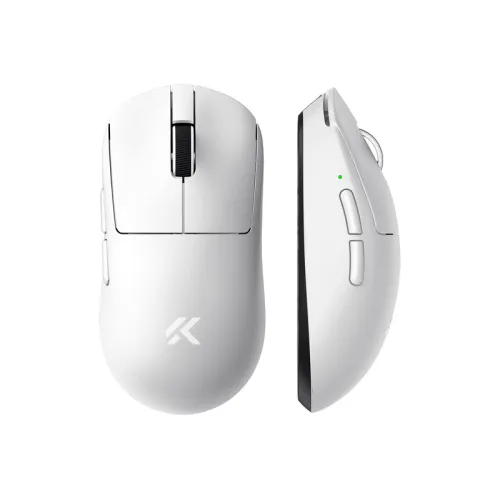
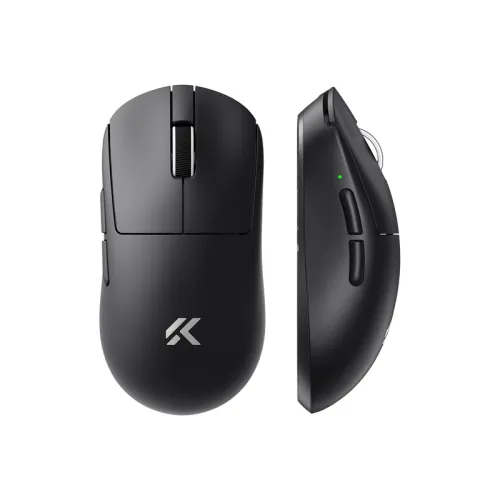
Unleash your full gaming potential with the MCHOSE A7 V2 Pro Lightweight Wireless Gaming Mouse, now available for gamers across Bangladesh. Engineered for competitive play, this cutting-edge mouse combines an ultra-lightweight design with high-performance components, offering an unparalleled gaming experience. Whether you're an esports professional or a dedicated enthusiast, the MCHOSE A7 V2 Pro delivers the speed, accuracy, and comfort you need to dominate the battlefield. Experience fluid movements, pinpoint accuracy, and the freedom of wireless connectivity, all optimized for the demanding Bangladesh gaming market.
Weighing in at an incredibly low 59 grams, the MCHOSE A7 V2 Pro is designed for lightning-fast reflexes and fatigue-free gaming sessions. Its featherlight construction allows for quick flicks and precise tracking, giving you a significant edge in fast-paced games. This lightweight marvel is perfect for gamers in Bangladesh looking to improve their reaction time and reduce wrist strain during extended play.
At the heart of the MCHOSE A7 V2 Pro lies the industry-leading PAW3395 optical sensor. This sensor provides exceptional accuracy, tracking speeds up to 650 IPS (Inches Per Second), and an acceleration of 50G. With a maximum DPI of 26,000, you can customize sensitivity to your exact preference, ensuring every movement translates perfectly onscreen. Experience pixel-perfect precision that is crucial for competitive gaming, making the MCHOSE A7 V2 Pro a top choice for serious gamers in Bangladesh.
The MCHOSE A7 V2 Pro offers versatile connectivity options to suit any setup. Enjoy lag-free gaming with ultra-low latency 2.4GHz wireless technology, providing a stable connection indistinguishable from wired. For everyday use or when on the go, connect via energy-efficient Bluetooth 5.1. And for critical moments or charging, simply plug in the included USB-C cable for a reliable wired connection. This flexibility ensures the MCHOSE A7 V2 Pro is always ready, no matter your gaming environment.
Equipped with premium Kailh GM 8.0 micro switches, the MCHOSE A7 V2 Pro guarantees crisp, tactile clicks with every press. These highly durable switches are rated for an astounding 80 million clicks, ensuring long-lasting performance and consistent responsiveness throughout the mouse's lifespan. Experience satisfying feedback and reliable actuation, giving you confidence in every command.
Powered by a high-capacity 300mAh rechargeable battery, the MCHOSE A7 V2 Pro provides up to 70 hours of continuous use on a single charge (depending on usage and settings). Spend more time gaming and less time worrying about recharging, thanks to its efficient power management. When it's time to recharge, the convenient USB-C port ensures quick and easy power-up.
The MCHOSE A7 V2 Pro features large, high-quality 100% PTFE feet (Teflon skates) that provide an incredibly smooth and effortless glide across any mousepad. This low-friction design minimizes drag, allowing for swift, unhindered movements and precise tracking, crucial for maintaining control in intense gaming scenarios.
Unlock the full potential of your MCHOSE A7 V2 Pro with its dedicated software. Customize DPI settings, program the 6 programmable buttons with macros, adjust polling rates, and fine-tune various parameters to match your unique playstyle. Create profiles for different games and switch between them seamlessly, giving you ultimate control over your gaming experience.
The MCHOSE A7 V2 Pro isn't just a mouse; it's an extension of your will in the game. Its ergonomic shape is designed for comfortable claw, palm, or fingertip grips, reducing fatigue during marathon gaming sessions. The combination of its lightweight build, precise sensor, and responsive switches translates into a tangible performance boost, allowing you to react faster, aim more accurately, and execute complex commands with ease. Elevate your gameplay and conquer your opponents with the MCHOSE A7 V2 Pro Lightweight Wireless Gaming Mouse.
| Feature | Specification |
|---|---|
| Model | MCHOSE A7 V2 Pro |
| Connectivity | Tri-Mode (2.4GHz Wireless, Bluetooth 5.1, USB-C Wired) |
| Sensor | PAW3395 Optical Sensor |
| Max DPI | 26,000 DPI |
| Max IPS | 650 IPS |
| Acceleration | 50G |
| Polling Rate | 1000Hz (1ms response time) |
| Switches | Kailh GM 8.0 Micro Switches |
| Switch Lifespan | 80 Million Clicks |
| Buttons | 6 Programmable Buttons |
| Weight | 59 ± 3g |
| Dimensions | 125 x 63 x 40 mm (Length x Width x Height) |
| Battery Type | Rechargeable Lithium-ion |
| Battery Capacity | 300mAh |
| Battery Life | Up to 70 hours (approx.) |
| Charging Port | USB-C |
| Feet | 100% PTFE (Teflon) Skates |
| Cable Length | 1.8m Braided USB-C Cable |
| Software Support | Yes, MCHOSE Customization Software |
| Compatibility | Windows, macOS (limited software support for macOS) |
| Color Options | Black, White (availability may vary) |
We typically reply within a few minutes