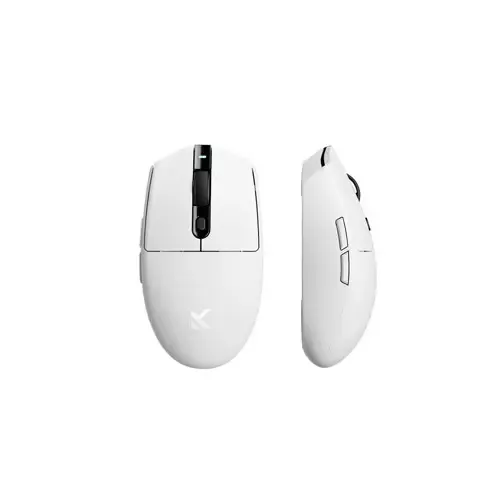
MCHOSE G3 Tri Mode 12000 DPI Gaming Mouse: Unleash Your Gaming Potential in Bangladesh
Elevate your gaming experience with the MCHOSE G3 Tri Mode 12000 DPI Gaming Mouse, a cutting-edge peripheral designed for serious gamers in Bangladesh. Combining exceptional precision, versatile connectivity, and an ultra-lightweight design, the MCHOSE G3 is engineered to give you the competitive edge whether you're battling foes in an intense FPS or executing complex macros in an MMO. This mouse offers unparalleled freedom with its Tri Mode connectivity, allowing you to switch seamlessly between ultra-fast 2.4GHz wireless, power-efficient Bluetooth 5.0, and a reliable wired USB-C connection. Discover why the MCHOSE G3 is quickly becoming a favorite among Bangladeshi gamers looking for performance and flexibility at a competitive price in Bangladesh.
Key Features of the MCHOSE G3 Gaming Mouse
The MCHOSE G3 is packed with features that cater to the demands of modern gaming. From its high-performance sensor to its durable switches and ergonomic design, every aspect is crafted for optimal performance and comfort.
- Tri Mode Connectivity: Experience ultimate versatility with three connection options. Choose between a lag-free 2.4GHz wireless connection for gaming, Bluetooth 5.0 for everyday productivity and extended battery life, or a wired USB-C connection for charging and guaranteed zero latency performance.
- High-Precision 12000 DPI Optical Sensor: Equipped with a top-tier optical sensor, the MCHOSE G3 offers adjustable DPI settings from 200 up to a blazing 12000 DPI. This allows for pixel-perfect tracking and lightning-fast responses, crucial for competitive gaming. Enjoy a tracking speed of 300 IPS and an acceleration of 35G, ensuring every movement is registered accurately.
- Ultra-Lightweight Design (68g): Weighing in at a mere 68 grams, the MCHOSE G3 provides effortless maneuverability, reducing hand fatigue during long gaming sessions. Its lightweight construction makes quick flicks and precise aiming feel natural and responsive.
- Durable Huano Blue Shell Pink Dot Switches: Built to last, the MCHOSE G3 features high-performance Huano Blue Shell Pink Dot mechanical switches, rated for an incredible 80 million clicks. These switches provide crisp, tactile feedback and consistent performance throughout their lifespan.
- 7 Programmable Buttons: Customize your gameplay with 7 independently programmable buttons. Assign macros, rebind keys, and execute complex commands with a single click, giving you a tactical advantage in any game.
- Dynamic RGB Lighting: Personalize your setup with vibrant, customizable RGB lighting. Choose from 16.8 million colors and various lighting effects through the MCHOSE G3's dedicated software, matching your mouse to your gaming rig's aesthetic.
- Long-Lasting Battery Life: The integrated 500mAh rechargeable Li-ion battery provides up to 70 hours of use on a single charge (without RGB) or approximately 40 hours with RGB enabled. Stay in the game longer without interruption.
- Ergonomic Ambidextrous Design: Designed for comfort, the MCHOSE G3 features an ergonomic shape that fits comfortably in most hand sizes and grip styles, reducing strain during extended use.
- 1000Hz Polling Rate: Enjoy an ultra-responsive 1ms response time thanks to the 1000Hz polling rate, ensuring every click and movement is registered instantly.
MCHOSE G3 Gaming Mouse Specifications Table
Here’s a detailed breakdown of the technical specifications for the MCHOSE G3 Tri Mode 12000 DPI Gaming Mouse, making it easier for you to compare and make an informed decision when buying a gaming mouse in Bangladesh.
| Feature |
Specification |
| Model Name |
MCHOSE G3 |
| Connectivity |
Tri Mode (2.4GHz Wireless, Bluetooth 5.0, USB-C Wired) |
| Sensor Type |
High-Precision Optical Sensor (e.g., PixArt PAW3335 equivalent) |
| DPI Range |
200 - 12000 DPI (Adjustable) |
| Tracking Speed |
300 IPS (Inches Per Second) |
| Acceleration |
35G |
| Polling Rate |
1000Hz (1ms Response Time) |
| Mouse Switches |
Huano Blue Shell Pink Dot Mechanical Switches |
| Switch Lifespan |
80 Million Clicks |
| Number of Buttons |
7 (Programmable) |
| Battery Type |
Rechargeable Li-ion Battery |
| Battery Capacity |
500mAh |
| Battery Life (approx.) |
Up to 70 hours (without RGB), 40 hours (with RGB) |
| Charging Port |
USB-C |
| Cable Type |
1.8m Braided USB-C Cable |
| RGB Lighting |
Customizable 16.8 Million Colors |
| Weight |
68g (approx.) |
| Dimensions (L x W x H) |
125 mm x 63 mm x 40 mm |
| Software Support |
Yes (for customization of DPI, buttons, RGB, etc.) |
| Color |
Matte Black |
| Compatibility |
Windows, macOS (basic functions), Linux (basic functions) |
Benefits of Choosing the MCHOSE G3 for Gamers in Bangladesh
Investing in the MCHOSE G3 Tri Mode Gaming Mouse brings a multitude of benefits to your gaming setup, making it a smart choice for gamers across Bangladesh:
- Enhanced Gaming Performance: The high DPI sensor and 1000Hz polling rate ensure every movement is precise and instant, giving you an edge in fast-paced games.
- Unmatched Versatility: Seamlessly switch between wireless freedom for gaming, Bluetooth for productivity, and wired for charging or zero-latency scenarios. This makes the MCHOSE G3 suitable for all aspects of your digital life.
- Reduced Fatigue: Its ultra-lightweight design and ergonomic shape mean you can game for hours without discomfort, allowing you to maintain peak performance longer.
- Durability and Reliability: With 80-million click rated switches, the MCHOSE G3 is built to withstand intense gaming sessions day in and day out, offering excellent value for its price in Bangladesh.
- Personalization: Customize DPI settings, button assignments, and RGB lighting to perfectly match your play style and aesthetic preferences, creating a truly personal gaming experience.
- Portability: The wireless capabilities and long battery life make it easy to take your MCHOSE G3 with you to LAN parties or gaming cafes, ensuring you always have your preferred mouse.
Usage Instructions and Setup
Getting started with your MCHOSE G3 Tri Mode Gaming Mouse is straightforward. Here’s a quick guide:
- Charging: Connect the included USB-C cable to the mouse and your computer's USB port or a USB wall adapter. The RGB lighting will indicate charging status.
- 2.4GHz Wireless Mode:
- Plug the included 2.4GHz USB dongle into an available USB port on your computer.
- Switch the mode selector switch on the bottom of the mouse to the "2.4G" position.
- The mouse should automatically connect. If not, press and hold the DPI button for 3 seconds to initiate pairing.
- Bluetooth 5.0 Mode:
- Switch the mode selector switch on the bottom of the mouse to the "BT" position.
- Press and hold the DPI button for 3 seconds until the RGB light blinks rapidly, indicating pairing mode.
- On your computer, go to Bluetooth settings and search for "MCHOSE G3". Select it to pair.
- Wired Mode:
- Connect the USB-C cable directly from the mouse to your computer.
- The mouse will automatically switch to wired mode and begin charging.
- Software Installation: For full customization of DPI levels, button assignments, macros, and RGB lighting effects, download the official MCHOSE G3 software from the manufacturer's website. This software is essential to unlock the mouse's full potential.
- DPI Adjustment: Use the dedicated DPI button (usually located behind the scroll wheel) to cycle through preset DPI levels. You can customize these levels via the software.
Product descriptions and technical specifications on this website may be generated with the assistance of AI and are provided for reference purposes only. Actual product features, performance, and specifications may vary — please verify all details directly with the official manufacturer's website before purchase. We do not manufacture; we are a seller and are not responsible for discrepancies in product features, behavior, or specifications.