Low Stock
Pick up from our office
1-3 business days
2-5 business days
Experience reliable and high-speed internet connectivity with the Mercusys MW306R 300 Mbps Multi-Mode Wireless N Router, now readily available in Bangladesh. Designed to meet the demands of modern homes and small offices, this versatile router offers robust performance, multiple operating modes, and easy management, all at an incredibly competitive price in Bangladesh. Whether you're streaming HD videos, engaging in online gaming, or simply browsing the web, the MW306R ensures a smooth and stable experience for all your connected devices.
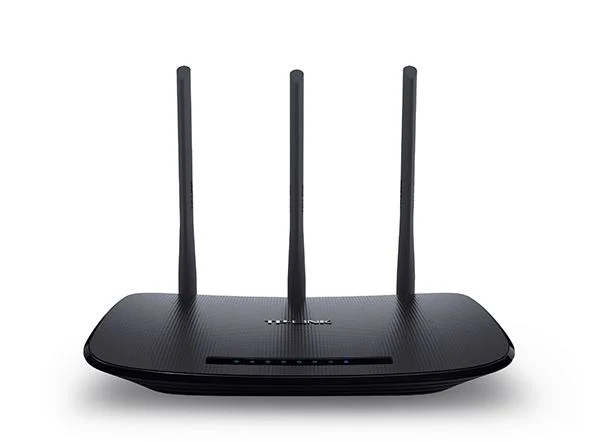
The Mercusys MW306R is more than just a router; it's a complete networking solution that adapts to your needs. With its three high-gain antennas and 300 Mbps wireless speed, it delivers extensive Wi-Fi coverage and eliminates dead zones. Its multi-mode functionality allows it to operate as a Router, Access Point, or Range Extender, making it an ideal choice for various networking scenarios across the Bangladesh market. Discover why the Mercusys MW306R is the smart choice for enhancing your internet experience today!
The Mercusys MW306R is a powerful yet affordable wireless router engineered to provide fast and stable Wi-Fi for your home or small office. Operating on the 2.4 GHz band with Wireless N technology, it achieves speeds of up to 300 Mbps, perfect for everyday online tasks. Equipped with three external 5 dBi antennas, it extends Wi-Fi coverage significantly, ensuring a strong signal throughout your living space. This router’s multi-mode capability (Router, Access Point, Range Extender) offers unparalleled flexibility, allowing you to configure it based on your specific networking requirements. For those searching for a reliable and budget-friendly wireless router in Bangladesh, the Mercusys MW306R stands out as a top contender, offering exceptional value for its performance.
At the heart of the Mercusys MW306R is its ability to deliver a consistent and high-speed wireless experience. With 300 Mbps on the 2.4 GHz band, it provides ample bandwidth for typical home activities. Whether you're watching your favorite shows on Netflix, playing multiplayer games, or conducting video conferences, the MW306R handles it with ease. The three powerful 5 dBi external antennas work in concert to broadcast a strong, reliable Wi-Fi signal across a larger area, ensuring that every corner of your home or office receives stable connectivity. This makes it an excellent choice for families in Bangladesh looking for a router that can support multiple devices simultaneously without performance degradation.
One of the most compelling features of the Mercusys MW306R is its multi-mode capability, offering unmatched flexibility for your networking needs:
This adaptability means you can configure the MW306R to best suit your current network infrastructure, making it a truly future-proof investment for any home or business in Bangladesh.
Security is paramount in today's connected world, and the Mercusys MW306R doesn't compromise. It supports robust WPA/WPA2 encryption standards, safeguarding your wireless network from unauthorized access. Furthermore, it offers essential management features:
These features give you complete control over your network, a crucial advantage for any household or small business owner in Bangladesh.
Setting up the Mercusys MW306R is incredibly straightforward, even for non-technical users. Its intuitive web-based interface guides you through the installation process in minutes. The quick setup wizard ensures you can get your network up and running without any hassle. Once configured, managing your network settings, guest access, and parental controls is simple and accessible. The MW306R is designed for convenience, making it a user-friendly option for anyone seeking a hassle-free networking solution across Bangladesh.
| Feature | Specification |
|---|---|
| Wireless Standards | IEEE 802.11n, IEEE 802.11g, IEEE 802.11b |
| Frequency | 2.4 - 2.4835 GHz |
| Signal Rate | Up to 300 Mbps |
| Antennas | 3x 5 dBi Fixed Omni-Directional Antennas |
| Ethernet Ports | 1x 10/100 Mbps WAN Port, 3x 10/100 Mbps LAN Ports |
| Buttons | Reset/WPS Button |
| External Power Supply | 9V/0.6A |
| Dimensions (W x D x H) | 169 x 116 x 35 mm (6.7 x 4.6 x 1.4 in) |
| Wireless Security | WPA-PSK/WPA2-PSK |
| Wireless Functions | Enable/Disable Wireless Radio, WMM |
| WAN Type | Dynamic IP, Static IP, PPPoE/PPPoE (Dual Access), L2TP (Dual Access), PPTP (Dual Access) |
| DHCP | Server, DHCP Client List, Address Reservation |
| Quality of Service (QoS) | WMM, Bandwidth Control |
| Port Forwarding | Virtual Server, UPnP, DMZ |
| Dynamic DNS | DynDNS, NO-IP |
| Firewall Security | SPI Firewall, IP and MAC Address Binding |
| Management | Access Control, Local Management, Remote Management |
| Guest Network | 2.4 GHz Guest Network |
| Operating Modes | Router Mode, Access Point Mode, Range Extender Mode |
| Operating Temperature | 0°C~40°C (32°F~104°F) |
| Storage Temperature | -40°C~70°C (-40°F~158°F) |
| Operating Humidity | 10%~90% non-condensing |
| Storage Humidity | 5%~90% non-condensing |
| Package Contents | MW306R Wireless N Router, Power Adapter, Quick Installation Guide, Ethernet Cable |
| Product Weight (Approx.) | 220g |
Setting up the Mercusys MW306R is a breeze. Follow these simple steps to get your network online:
mwlogin.net or 192.168.1.1 into the address bar and press Enter.For detailed instructions on Access Point or Range Extender modes, refer to the Quick Installation Guide included in the package or Mercusys's official support website.
The Mercusys MW306R 300 Mbps Multi-Mode Wireless N Router is widely available across Bangladesh, catering to the growing demand for affordable and reliable networking solutions. You can easily find this router at leading electronics retailers, computer shops, and popular e-commerce platforms throughout the country. For those searching for "Mercusys MW306R in Bangladesh" or "wireless router price in Bangladesh," you'll find that this model offers exceptional value.
The Mercusys MW306R price in Bangladesh is highly competitive, typically ranging from ৳1,250 to ৳1,550, depending on the retailer, ongoing promotions, and warranty offerings. We strive to provide the best price in Bangladesh, ensuring you get a high-quality product without stretching your budget. You can often find special deals and discounts during festive seasons or online sales events. Check with your local electronics store or search online for "Mercusys MW306R near me" to find the most current pricing and availability. We also offer convenient delivery in Bangladesh, bringing this excellent router directly to your doorstep, no matter where you are in the country.
When you choose to purchase your Mercusys MW306R from us, you're not just buying a router; you're investing in a seamless shopping experience and reliable after-sales support. We guarantee:
Upgrade your home network today with the Mercusys MW306R and enjoy uninterrupted connectivity. Order now and experience the difference!
We typically reply within a few minutes