Netgear GSM7328FS 24 Port Pro Safe Gigabit Fiber Stackable L3 Managed Switch In Bangladesh
Now, Netgear GSM7328FS 24 Port Pro Safe Gigabit Fiber Stackable L3 Managed Switch is now available in Bangladesh. Get the original products at the most affordable price only at BDSHOP.COM and enjoy the quality with the promise of the best customer service in Bangladesh for Mechanical Keyboard.
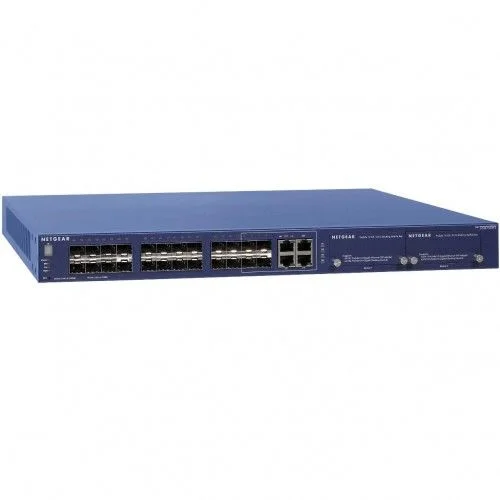
The Netgear GSM7328FS 24 Port Pro Safe Gigabit Fiber Stackable L3 Managed Switch is a network switch with 24 SFP slots for fiber connectivity. In addition to 20 dedicated Gigabit SFP slots, the switch features four shared comb ports, which can be used for either SFP or RJ-45 copper Ethernet connectivity. The switch provides both Layer 2 and Layer 3 managed switching functionality for enterprise-level networks. The switch features an intuitive browser interface for configuration, helping to make it an excellent addition to a business network. The switch features 24 SFP slots for fiber connectivity. Four of these slots are shared with standard 10/ 100/ 1000 Gigabit Ethernet ports. This makes the switch an ideal solution for network environments that include wireless access points, VoIP phones, and IP-based surveillance cameras. The switch can also be stacked via any one of its four 10 Gigabit Ethernet/ 24G Stacking Module Bays. The switch supports Layer 2 and Layer 3 network management. This allows you to configure multiple types of switching including VLAN and Quality of Service (QoS) settings for better VoIP performance. The switch is housed in a sturdy form factor and includes a kit for rack mounting. This allows you to easily add it to a professional network via an equipment rack.The Netgear GSM7328FS 24 Port Pro Safe Gigabit Fiber Stackable L3 Managed Switch comes with 3 years of Warranty.
Specifications
HARDWARE FEATURES
Dimensions (L x W x H )
44 x 4.3 x 38.5 cm
Interface
24x SFP Slots4x 10/100/1000 Mbps Gigabit Ethernet Ports (Shared)
Power Supply
AC: 120 VACConsumption: 78W
Weight
5.4 kg
Main Feature
Type
Managed
Port
24x SFP Slots4x 10/100/1000 Mbps Gigabit Ethernet Ports (Shared)
Network Standard
IEEE 802.3i 10BASE-T, IEEE 802.3u 100BASE-TX, IEEE 802.3u 100BASE-FX, IEEE 802.3ab 1000BASE-T, IEEE 802.3z 1000BASE-X, IEEE 802.3x Flow Control, IEEE 802.3ae 10000BASE-X
Transmission Method
Store-and-Forward
Data Transmission Rate
10/100/1000 Mbps
MAC Address Table
8K
Environment
OperatingTemperature: 32-122°F (0-50°C)Humidity: 0-90%, non-condensingAltitude: 10,000' (3000 m)StorageTemperature -4-158° F (-20-70° C)Humidity: 0-95%, non-condensingAltitude: 10,000' (3000 m)
Manufacturer Warranty
Warranty
3 Years Of Warranty.
Features
Brand: SanDisk
Model Description: 24 ports Gigabit Fiber, Layer 3 software package
Ordering Number: GSM7328FS
RJ45 Ports: 4 x 10/100/1000
2 x 10GBASE-T (Max: 4)
Fiber SFP+ (1000/10G) : 2 x SFP+ (Max: 4)
Fiber SFP (100/1000) : 24 x SFP
Power over Ethernet: N/A
PoE Budget (Watts): N/A
Redundant Power Supply: RPS + Modular PSU
Feature Set: Full Layer 3
Form Factor: Rack 1U - Stackable
3 years of Warranty.
Description
Layer 2+ or Layer 3you can choose the right one (there are upgrade paths)• Because RIP, OSPF, VRRP, or PIM aren’t always needed, the M5300 series comes with port-based/ VLAN-based/subnet-based “static routing” Layer 2+ versions• You can save costs now and should new applications arise, there’s a seamless upgrade path with Layer 3 license upgrades• When dynamic routing is an immediate requirement, the M5300 series directly comes with Layer 3 versions for Gigabit copper and fiber aggregation• All M5300 series versions share the same code base for easier deployment and maintenance; same firmware across all platforms• M5300 series is flexible enough for mixed stacking between Layer 2+.Layer 3 versions10 Gigabit Ethernet Copper and IPv6 ready• Two embedded 10 Gigabit interfaces streamline network uplinks with SFP+ and 10GBASE-T (RJ45) combo ports• Two 10 Gigabit I/O bays for additional uplinks or local/distant stacking, provide versatile 10 Gigabit deployment capabilities Industry leading availability• Removable, modular power module for the main power supply• Hot-swap RPS/EPS capabilities for 100% uptime when the main power supply is replaced.Industry-standard management• Industry-standard command-line interface (CLI) and fully functional NETGEAR web interface (GUI)• Single-pane-of-glass NMS300 management platform with automatic deployment and mass-configuration support.
TagsM5300 datasheetNetgear prosafe m5300-52g3Netgear 48-port managed switch24-port managed switchNetgear click switchNetgear 26-port gigabit switchNetgear managed switch 16 port24 port switch price in BangladeshCisco 24-port managed switch price in Bangladesh2 port switch price in BangladeshCisco switch price in BangladeshSFP switch price in BangladeshManageable switch price in Bangladesh8 port PoE switch price in Bangladesh8 port gigabit switch price in BangladeshManaged switch priceManaged vs unmanaged switchManaged switch amazonManaged vs unmanaged switch RedditManaged switch vs routerManaged vs unmanaged switch for gaming5 characteristics of a managed switch and unmanaged switchBest managed switchMulti-gigabit managed switch.
FAQQ. What can you do with a managed switch?Ans: Managed switches let users adjust each port on the switch to any setting, enabling them to manage, configure and monitor the network in many ways. They also provide greater control over how data travels over the network and who can access that data.Q. Do managed switches work out of the box?Ans: It is possible to run a managed switch and use it out of the box just like an unmanaged switch. The convenience of purchasing a managed switch is that if you later desire to change the config you can still do and start planning the section of your network you'd wish for your specific networking needs.Q. Are managed switches worth it?Ans: The short answer is no. There is no fundamental difference in speed between managed and unmanaged switches. However, it is important to note that a managed switch provides significantly better overall network performance, which tends to enhance speed in the long run.Q. Do I have to set up a managed switch?Ans: You would go with a managed switch if you are going to have multiple subnets/VLANs or need to configure/manage specific ports etc. This is assuming there is some other device in place that will be handling the routing such as a firewall, or basic router, etc.
Are you looking for a "Netgear GSM7328FS 24 Port Pro Safe Gigabit Fiber Stackable L3 Managed Switch" Review & Specifications in Bangladesh with home delivery? Then BDSHOP.com is a great place to buy the "Netgear GSM7328FS 24 Port Pro Safe Gigabit Fiber Stackable L3 Managed Switch" in Dhaka, Chittagong, Sylhet, and all over Bangladesh and with Cash on Delivery. Online Shopping in Bangladesh for Genuine products, awesome customer support, easy returns, and really fast deliveries. Besides, there are a bunch of reasons why our customers keep coming back to our Online Shopping BD.
**Join Our Official Facebook Group BD SHOP CLUB.
Product descriptions and technical specifications on this website may be generated with the assistance of AI and are provided for reference purposes only. Actual product features, performance, and specifications may vary — please verify all details directly with the official manufacturer's website before purchase. We do not manufacture; we are a seller and are not responsible for discrepancies in product features, behavior, or specifications.