13% OFF
Pick up from our office
1-3 business days
2-5 business days
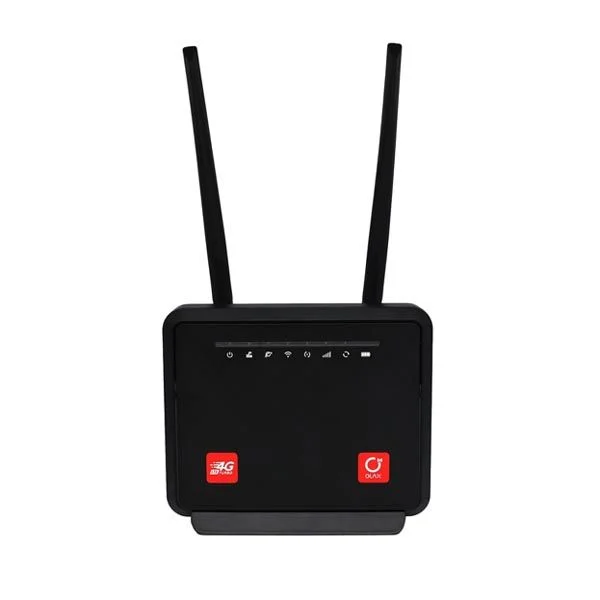
Experience reliable and high-speed internet connectivity anywhere in Bangladesh with the **Olax MC60 300Mbps WIFI Speed 4G Router**. Priced at just ৳6000.00, this versatile device transforms your 4G cellular data into a robust Wi-Fi network, making it an ideal solution for homes, small offices, shops, and even remote locations where traditional broadband might be unavailable or unreliable. With its impressive 300Mbps Wi-Fi speed and fast 4G LTE capabilities, the Olax MC60 ensures that you and up to 32 connected devices stay online, productive, and entertained without interruption. In today's fast-paced digital world, a stable internet connection is not a luxury but a necessity. The Olax MC60 4G Router addresses this need head-on, offering a plug-and-play solution that requires only a standard SIM card from any major mobile operator in Bangladesh. Whether you're streaming HD videos, participating in online meetings, gaming, or simply browsing, the Olax MC60 delivers a consistent and powerful internet experience. This router is quickly becoming a popular choice for users across Bangladesh looking for an efficient and affordable internet solution.
The Olax MC60 is engineered for performance and convenience. It supports all major 4G LTE bands used by telecommunication providers in Bangladesh, ensuring broad compatibility and optimal signal reception. Forget the hassle of complicated installations or waiting for cable connections. Simply insert your active 4G SIM card, power on the device, and instantly create a secure Wi-Fi hotspot. It's perfect for families, students, and professionals in Bangladesh who demand flexible and high-performance internet access.
The Olax MC60 is packed with features designed to provide a superior internet experience. Its robust build and advanced technology make it a standout choice for anyone seeking a reliable 4G router in Bangladesh. * **High-Speed 4G LTE Connectivity:** Enjoy blistering fast 4G LTE speeds, with download capabilities of up to 150Mbps and upload speeds of up to 50Mbps. This ensures smooth streaming, quick downloads, and efficient online gaming, making it perfect for the dynamic internet usage patterns in Bangladesh. * **Fast 300Mbps Wi-Fi (802.11n):** Create a powerful 2.4GHz Wi-Fi network with speeds up to 300Mbps, ideal for everyday internet tasks, video calls, and connecting multiple devices simultaneously. * **Plug-and-Play SIM Slot:** The router features a standard (Mini-SIM) card slot, allowing for quick and easy setup. Just insert your active 4G SIM card from Grameenphone, Robi, Banglalink, Teletalk, or Airtel (Robi) and you're ready to go. * **Connect Up to 32 Devices:** Share your high-speed internet connection with a large number of users and devices, including smartphones, tablets, laptops, smart TVs, and more, without compromising performance. This makes it an excellent choice for small offices or larger households in Bangladesh. * **Multiple Ethernet Ports:** Equipped with two 10/100Mbps Ethernet ports (1 WAN/LAN and 1 LAN), the Olax MC60 allows for stable wired connections to desktop computers, gaming consoles, or other network devices, offering flexibility for various networking needs. * **Reliable & Secure Network:** The router supports WPA/WPA2-PSK security protocols, ensuring your network is protected from unauthorized access. Features like MAC address filtering and a built-in firewall add extra layers of security. * **Compact and Sleek Design:** With its modern and minimalist white design, the Olax MC60 blends seamlessly into any home or office environment. Its compact size also makes it easy to place discreetly. * **Wide 4G Band Support:** Compatible with a broad range of FDD-LTE and TDD-LTE bands (B1/B3/B5/B7/B8/B20/B28, B38/B40/B41), ensuring excellent coverage and compatibility with all major mobile networks across Bangladesh.
To help you make an informed decision, here are the comprehensive specifications for the Olax MC60 300Mbps WIFI Speed 4G Router.
| Feature | Specification |
|---|---|
| Model | Olax MC60 |
| Wi-Fi Speed | 300Mbps (2.4GHz) |
| 4G LTE Speed | Category 4 (Download up to 150Mbps, Upload up to 50Mbps) |
| Wi-Fi Standard | IEEE 802.11b/g/n |
| Wi-Fi Frequency | 2.4GHz |
| Antennas | 2 x Internal Wi-Fi Antennas, 2 x Internal 4G/LTE Antennas |
| Network Modes | 4G LTE FDD/TDD, 3G WCDMA |
| 4G LTE Bands Supported (Bangladesh compatible) | FDD-LTE: B1/B3/B5/B7/B8/B20/B28 TDD-LTE: B38/B40/B41 |
| 3G WCDMA Bands Supported | B1/B5/B8 |
| SIM Card Slot | 1 x Standard SIM (Mini-SIM, 2FF) |
| Ethernet Ports | 1 x 10/100Mbps WAN/LAN Port, 1 x 10/100Mbps LAN Port |
| Maximum Wi-Fi Users | Up to 32 devices |
| Security Protocols | WPA/WPA2-PSK, WPA/WPA2, MAC Address Filtering, SSID Broadcast Enable/Disable |
| Advanced Features | DHCP Server, NAT, Port Forwarding, VPN Pass-through, Firewall, SMS Function, TR069, Parental Control, Guest Network |
| LED Indicators | Power, Wi-Fi, LAN, 4G Signal Strength |
| Power Supply | DC 12V / 1A |
| Dimensions (L x W x H) | 150 mm x 105 mm x 25 mm |
| Weight | Approx. 250 grams (excluding power adapter) |
| Operating Temperature | 0°C to 40°C |
| Storage Temperature | -40°C to 70°C |
| Color | White |
The Olax MC60 4G Router offers numerous advantages, making it a compelling choice for internet users across Bangladesh. * **Ultimate Flexibility:** No need for fixed line installations. Take your internet with you when you move or travel within Bangladesh, perfect for temporary setups or mobile businesses. * **Cost-Effective Solution:** For many, mobile data packages offer a more flexible and often more affordable internet solution compared to traditional broadband, especially with the competitive data plans available in Bangladesh. * **Instant Setup:** Get online in minutes. The plug-and-play design means you don't need technical expertise to set up your network. * **Reliable Backup Internet:** Even if you have a wired broadband connection, the Olax MC60 serves as an excellent backup, ensuring you're never without internet during outages. * **Ideal for Remote Areas:** For users in rural or developing areas of Bangladesh where fiber or DSL infrastructure is limited, the Olax MC60 provides a vital link to the digital world. * **Enhanced Productivity:** With stable and fast internet, remote work, online learning, and business operations become smoother and more efficient.
Setting up your Olax MC60 is straightforward and takes just a few simple steps: 1. **Insert SIM Card:** Ensure your 4G SIM card is active and has a data plan. Gently insert the standard (Mini-SIM) card into the designated SIM card slot on the router until it clicks into place. 2. **Connect Power:** Plug the provided power adapter into the router's DC power port and then into a wall outlet. The router will power on automatically. 3. **Wait for Connection:** Allow a few moments for the router to boot up and establish a connection to the 4G network. The 4G signal indicator LED will turn solid green or blue when connected. 4. **Connect to Wi-Fi:** On your device (smartphone, laptop, etc.), search for available Wi-Fi networks. Locate the SSID (network name) printed on the label at the bottom of the Olax MC60 router. Enter the Wi-Fi password (also found on the label) to connect. 5. **Wired Connection (Optional):** For wired devices, connect an Ethernet cable from the router's LAN port to your computer or other network device. 6. **Access Admin Panel (Optional):** For advanced settings, open a web browser and type the default IP address (e.g., 192.168.1.1 or 192.168.0.1) into the address bar. Enter the default username and password (usually "admin" for both) found on the router's label.
We typically reply within a few minutes