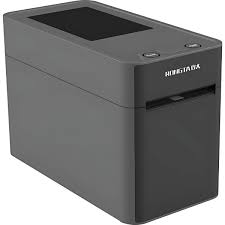
RONGTA RP215-U Wristband Barcode Label Printer with USB Interface – Your Ultimate Printing Solution in Bangladesh
Elevate your identification and tracking systems with the advanced RONGTA RP215-U Wristband Barcode Label Printer with USB Interface. Designed for precision, speed, and reliability, this versatile direct thermal printer is engineered to meet the demanding requirements of various industries across Bangladesh, including healthcare, event management, retail, and logistics. With its dedicated capability to print high-quality wristbands and standard barcode labels, the RP215-U ensures accuracy and efficiency in every print job. Discover the competitive RONGTA RP215-U price in Bangladesh and revolutionize your operational workflows today.
Overview: Precision Printing for Modern Businesses
The RONGTA RP215-U is a compact yet powerful direct thermal printer that specializes in producing crisp, clear barcodes and text on both wristbands and conventional labels. Its robust design and intuitive operation make it an ideal choice for environments where quick and reliable identification is paramount. Equipped with a standard USB interface, it offers seamless connectivity to your existing systems, ensuring a hassle-free setup and integration. Whether you need to print patient wristbands in a hospital, entry wristbands for an event, or product labels for your inventory, the RP215-U delivers consistent, high-quality results, making it a sought-after barcode printer in Bangladesh.
Experience unparalleled performance and durability with a printer built to withstand continuous use. The RONGTA RP215-U is not just a printer; it's an investment in efficiency and accuracy for businesses seeking reliable identification solutions available in Bangladesh.
Key Features of the RONGTA RP215-U
- High-Resolution Direct Thermal Printing: Achieve sharp, scannable 203 DPI (dots per inch) resolution, perfect for detailed barcodes, small text, and graphics on both wristbands and labels. This ensures excellent readability and scan accuracy, critical for operations in Bangladesh.
- Versatile Media Handling: Specifically designed to accommodate a wide range of thermal media, including various sizes of thermal wristbands (up to 80mm width) and standard thermal labels. This flexibility makes it suitable for diverse applications.
- Fast Print Speed: Boost productivity with a maximum print speed of 127 mm/s (5 inches per second). This rapid output minimizes waiting times, especially crucial in high-volume environments like hospitals or event check-ins across Bangladesh.
- Standard USB Interface: Ensures universal compatibility and easy plug-and-play connectivity with most Windows, Linux, and Mac operating systems, simplifying integration into your existing IT infrastructure.
- Compact and Space-Saving Design: With its small footprint (approximately 150mm x 210mm x 150mm), the RP215-U fits comfortably on any desk or counter, making it ideal for workplaces where space is at a premium.
- Durable and Reliable Construction: Built with high-quality components, this printer is designed for long-term reliability and consistent performance, even in demanding operational settings.
- Easy Media Loading: Features a user-friendly design for quick and effortless loading of wristbands and labels, minimizing downtime and improving operational efficiency.
- Advanced Sensor Technology: Equipped with gap, black mark, and cover open sensors to ensure accurate label positioning and prevent misprints, enhancing overall print quality.
- Wide Compatibility: Supports various barcode symbologies (1D and 2D) and comes with drivers for major operating systems, ensuring broad application support.
Comprehensive Specifications Table
Below are the detailed technical specifications for the RONGTA RP215-U Wristband Barcode Label Printer, providing all the information you need to make an informed decision when buying in Bangladesh.
| Feature |
Specification |
| Model Name |
RONGTA RP215-U |
| Printing Method |
Direct Thermal |
| Resolution |
203 DPI (8 dots/mm) |
| Print Speed (Max) |
127 mm/s (5 inches/s) |
| Print Width (Max) |
56 mm (2.2 inches) |
| Print Length (Max) |
2286 mm (90 inches) |
| Media Type |
Thermal wristbands, Continuous paper, Gap paper, Black mark paper, Folded paper |
| Media Width |
20 mm - 80 mm (0.78 inches - 3.15 inches) |
| Media Thickness |
0.06 mm - 0.20 mm |
| Media Roll Diameter (Max) |
127 mm (5 inches) |
| Core Diameter |
25.4 mm (1 inch) or 38.1 mm (1.5 inches) |
| Interface |
USB 2.0 |
| Memory |
8MB SDRAM, 4MB Flash Memory |
| Sensors |
Gap sensor, Black mark sensor, Cover open sensor |
| Emulation |
TSPL, EPL, ZPL, DPL |
| Barcode Support (1D) |
Code 39, Code 93, Code 128UCC, Code 128 subsets A.B.C, Codabar, Interleave 2 of 5, EAN-8, EAN-13, EAN-128, UPC-A, UPC-E, EAN and UPC 2(5) digits add-on, MSI, PLESSEY, POSTNET, China POST |
| Barcode Support (2D) |
PDF-417, Maxicode, DataMatrix, QR code |
| Power Supply |
Input: AC 100-240V, 50/60Hz; Output: DC 24V, 2.5A |
| Dimensions (L x W x H) |
210 mm x 150 mm x 150 mm (8.27 x 5.91 x 5.91 inches) |
| Weight |
Approx. 1.5 kg (3.3 lbs) |
| Operating Conditions |
Temperature: 5°C to 40°C (41°F to 104°F), Humidity: 25% to 85% non-condensing |
| Storage Conditions |
Temperature: -40°C to 60°C (-40°F to 140°F), Humidity: 10% to 90% non-condensing |
| Software Compatibility |
Windows XP/Vista/7/8/10/11, Linux, Mac OS |
| Certifications |
CE, FCC, RoHS |
Benefits of Choosing RONGTA RP215-U for Your Business
- Enhanced Efficiency: Speed up your operations with fast printing and easy media loading, reducing wait times and increasing throughput for patient check-ins, event entries, or inventory labeling.
- Improved Accuracy & Safety: For healthcare facilities in Bangladesh, precise wristband printing ensures correct patient identification, reducing medical errors. For events, accurate wristbands prevent unauthorized access.
- Cost-Effective Solution: Direct thermal printing eliminates the need for expensive ink ribbons or toner, significantly lowering your operational costs over time.
- Space Optimization: Its compact size is perfect for small offices, reception desks, or mobile carts, making it a flexible solution for various business setups.
- User-Friendly Operation: Simple setup and intuitive controls mean less training time for staff and fewer operational errors.
- Versatile Applications: Beyond wristbands, it handles standard labels, making it a multi-purpose tool for various labeling needs, from shipping labels to asset tags.
- Reliable Performance: RONGTA is known for its durable products, and the RP215-U is built to offer consistent performance day in and day out, minimizing maintenance needs.
Usage Instructions (Simplified)
- Unpack and Connect: Carefully unpack the printer. Connect the power adapter and the USB cable to your computer.
- Install Drivers: Insert the driver CD (if provided) or download the latest drivers from the RONGTA website. Follow the on-screen instructions to install the printer drivers on your Windows, Linux, or Mac OS system.
- Load Media: Open the printer cover. Align your thermal wristbands or labels on the media roll holder, ensuring the printable side faces up. Feed the media through the guides until it is detected by the printer's sensors. Close the cover.
- Calibrate (Optional but Recommended): Some applications or media types may require initial calibration. Refer to the user manual for specific instructions on how to calibrate the printer for optimal performance with your chosen media.
- Print: Open your labeling software (e.g., Bartender, Labeljoy) or application. Design your wristband or label, select the RONGTA RP215-U as your printer, and initiate the print command.
- Maintenance: Regularly clean the print head with an alcohol wipe to ensure consistent print quality and extend the printer's lifespan.
Product descriptions and technical specifications on this website may be generated with the assistance of AI and are provided for reference purposes only. Actual product features, performance, and specifications may vary — please verify all details directly with the official manufacturer's website before purchase. We do not manufacture; we are a seller and are not responsible for discrepancies in product features, behavior, or specifications.