30% OFF
SOLD OUT
Pick up from our office
1-3 business days
2-5 business days
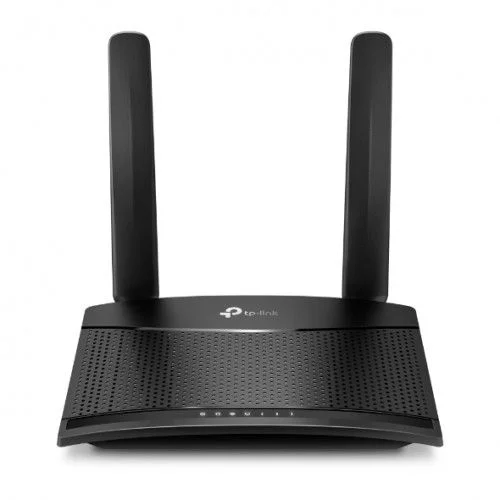
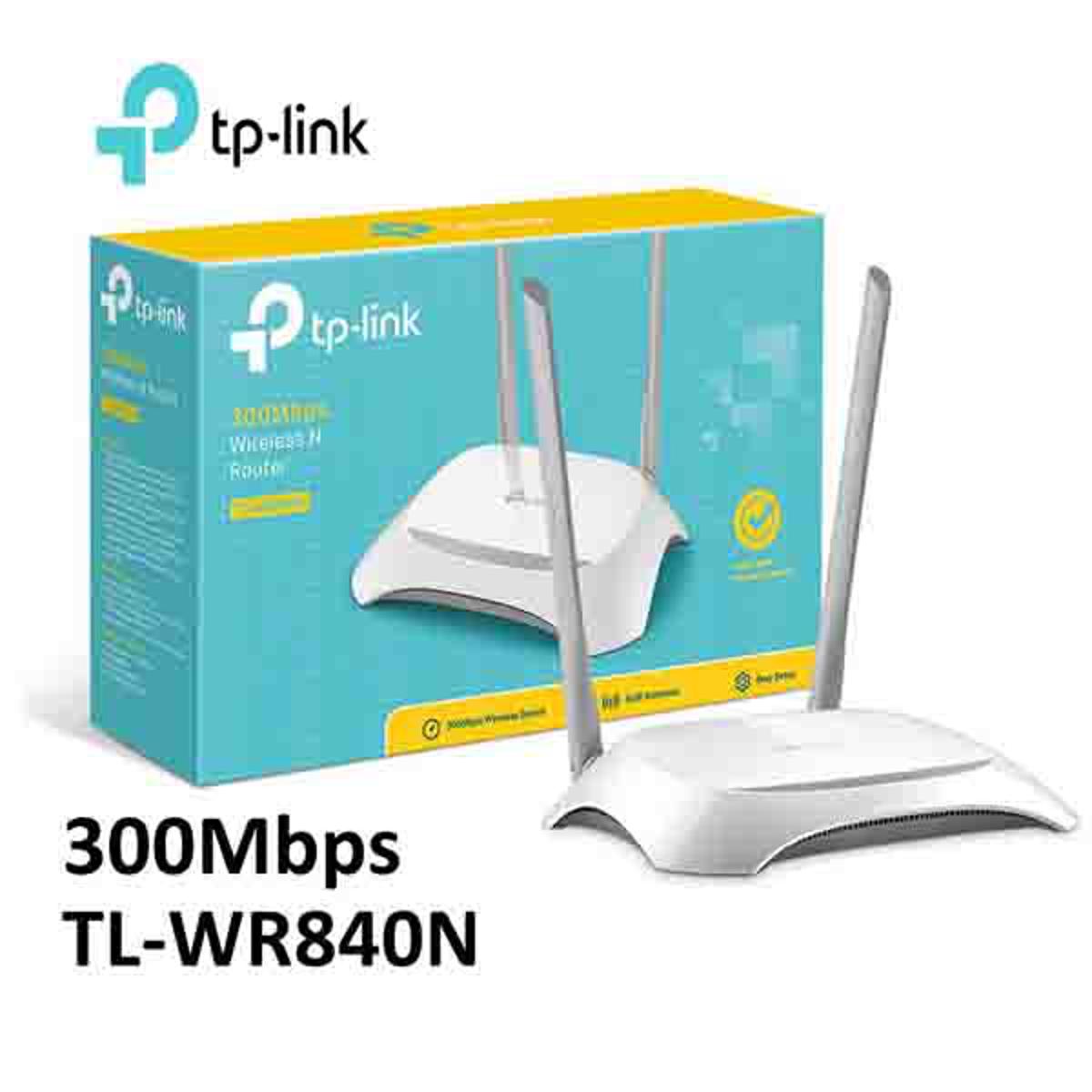
Welcome to the ultimate solution for reliable and high-speed internet connectivity in your home or small office! The **TP-Link TL-WR840N 300Mbps Wireless Wi-Fi Router** is engineered to deliver exceptional wireless performance, making it the perfect choice for users across Bangladesh seeking a stable and fast network experience. Whether you're streaming HD videos, engaging in online gaming, or simply browsing the web, this router ensures smooth, uninterrupted access for all your devices.
Now, the original TP-Link TL-WR840N 300Mbps Wireless Wi-Fi Router is readily available in Bangladesh at an unbeatable price of **৳1850.00 BDT**. Experience the quality and advanced features that TP-Link is renowned for, backed by a comprehensive 1-year warranty. Get yours today and transform your home networking!
The TP-Link TL-WR840N is a combined wired/wireless network connection device specifically designed to meet the growing demands of small businesses and home office networking. This sleek and fashionable router creates an exceptional and advanced wireless performance, making it an ideal choice for bandwidth-sensitive tasks like streaming HD content, making VoIP calls, and enjoying lag-free online gaming. With its 300Mbps wireless N speed, it ensures that your internet experience is always fast and efficient.
This router is fully compatible with IEEE 802.11b/g/n standards, providing a high-speed solution based on 802.11n technology. Users can enjoy wireless performance at up to 300Mbps, which is more than sufficient for demanding home networking needs such as large file downloads and smooth multimedia consumption. The inclusion of a WPS (Wi-Fi Protected Setup) button on its elegant exterior guarantees WPA2 encryption, safeguarding your network from unauthorized intrusions. For those looking for a dependable and affordable Wi-Fi router in Bangladesh, the TL-WR840N stands out as a top contender.
The TP-Link TL-WR840N boasts a wireless transmission rate of up to 300Mbps, making it an excellent choice for both bandwidth-intensive applications and everyday internet tasks. This speed is perfect for smooth HD video streaming, online gaming without frustrating lag, and rapid downloading of large files. Powered by 802.11n technology, it delivers a robust and reliable connection across your home or office in Bangladesh.
Equipped with two fixed omnidirectional antennas, the TL-WR840N ensures a stable and widespread Wi-Fi signal. These antennas work in tandem to minimize dead zones and provide consistent coverage throughout your space. With an impressive signal range that can cover up to approximately 400 square meters (or about 1600 square feet), this router is perfectly capable of blanketing an entire apartment or a small office with strong Wi-Fi, making it a popular choice for homes and businesses across Bangladesh.
The TL-WR840N is more than just a standard router; it offers multiple operational modes to suit various networking needs:
Setting up the TL-WR840N is a breeze, thanks to its intuitive web interface and the powerful TP-Link Tether app. You can get your network up and running in minutes, even if you're not a tech expert. The Tether app allows you to manage your network settings directly from any Android or iOS device, offering convenient control over features like parental controls, access control, and guest network settings. This ease of use makes it highly appealing for users in Bangladesh looking for hassle-free network management.
Security is paramount, and the TL-WR840N doesn't disappoint. It supports WPA/WPA2 encryption standards, ensuring your wireless network is protected from external intrusions. Additionally, it offers:
The TP-Link TL-WR840N is fully compatible with IPv6, the latest generation of Internet Protocol. This future-proof capability ensures that your router will remain relevant as internet services evolve, providing a seamless transition to the next era of internet connectivity in Bangladesh.
For users who enjoy IPTV services, the TL-WR840N offers dedicated optimization. It supports IGMP Proxy/Snooping, Bridge, and Tag VLAN functionalities, which are essential for optimizing IPTV streaming. This means you can enjoy clear, uninterrupted streaming of your favorite TV channels and content without buffering, a significant advantage for entertainment enthusiasts in Bangladesh.
IP QoS allows you to intelligently manage bandwidth to ensure that critical applications receive the necessary resources. You can prioritize specific devices or activities, ensuring that, for example, your online gaming session or video conference gets priority over background downloads. This feature helps prevent network congestion and guarantees a smoother experience for all users.
The TP-Link TL-WR840N is an excellent investment for anyone in Bangladesh seeking a reliable, high-performance, and feature-rich Wi-Fi router without breaking the bank. Its 300Mbps speed is perfectly suited for the demands of modern households and small offices. The robust coverage provided by its dual antennas ensures that every corner of your space receives a strong signal. With multiple operating modes, parental controls, guest network, and IPv6 support, it offers incredible versatility and security. The ease of setup via the Tether app is a huge plus for users who prefer convenience. When considering value for money, performance, and brand trust, the TL-WR840N stands out as one of the best Wi-Fi router options available in the Bangladesh market today.
| Feature | Specification |
|---|---|
| Product Name | TP-Link TL-WR840N 300Mbps Wireless Wi-Fi Router |
| Brand | TP-LINK |
| Model | TL-WR840N |
| Wireless Standards | IEEE 802.11n, IEEE 802.11g, IEEE 802.11b |
| Frequency | 2.4 - 2.4835 GHz |
| Signal Rate | 11n: Up to 300Mbps (dynamic) 11g: Up to 54Mbps (dynamic) 11b: Up to 11Mbps (dynamic) |
| EIRP | <20dBm (EIRP) |
| Antennas | 2 x Fixed Omni-Directional Antennas |
| Interface | 1 x 10/100Mbps WAN Port 4 x 10/100Mbps LAN Ports |
| Buttons | WPS/Reset Button, Power On/Off Button |
| External Power Supply | 9VDC / 0.6A |
| Wireless Security | 64/128-bit WEP, WPA/WPA2, WPA-PSK/WPA2-PSK encryption |
| Wireless Functions | Enable/Disable Wireless Radio, WDS Bridge, WMM, Wireless Statistics |
| WAN Type | Dynamic IP, Static IP, PPPoE, PPTP (Dual Access), L2TP (Dual Access), BigPond |
| DHCP | Server, DHCP Client List, Address Reservation |
| Port Forwarding | Virtual Server, Port Triggering, UPnP, DMZ |
| Dynamic DNS | DynDns, Comexe, NO-IP |
| VPN Pass-Through | PPTP, L2TP, IPSec (ESP Head) |
| Access Control | Parental Control, Local Management Control, Host List, Access Schedule, Rule Management |
| Firewall Security | DoS, SPI Firewall, IP Address Filter/MAC Address Filter/Domain Filter, IP and MAC Address Binding |
| Management | Access Control, Local Management, Remote Management |
| Guest Network | 1 x 2.4GHz Guest Network |
| Operating System Compatibility | Windows 2000/XP/Vista, Windows 7/8/8.1/10, Mac OS, NetWare, UNIX, Linux based operating system |
| Dimensions (W x D x H) | 182 x 128 x 35 mm (7.2 x 5.0 x 1.4 inches) |
| Weight | Approx. 220g |
| Operating Temperature | 0℃~40℃ (32℉~104℉) |
| Storage Temperature | -40℃~70℃ (-40℉~158℉) |
| Operating Humidity | 10%~90% non-condensing |
| Storage Humidity | 5%~90% non-condensing |
| Certifications | CE, RoHS, FCC |
| Package Contents | 1 x TP-Link TL-WR840N 300Mbps Wireless Wi-Fi Router 1 x Power Adapter 1 x Ethernet Cable 1 x Quick Installation Guide |
| Warranty | 1 Year Official TP-Link Warranty |
Setting up your TP-Link TL-WR840N is straightforward:
For more detailed instructions, refer to the Quick Installation Guide included in the package or visit the TP-Link support website.
The **TP-Link TL-WR840N 300Mbps Wireless Wi-Fi Router** is widely available across Bangladesh. You can purchase this reliable router for just **৳1850.00 BDT**. To find the best price in Bangladesh and ensure you're getting an original product with official warranty, we recommend checking reputable online stores and authorized TP-Link retailers. Many stores offer home delivery across Dhaka, Chittagong, Sylhet, and other major cities, making it convenient to get your hands on this essential networking device. If you're searching for "TP-Link TL-WR840N price in Bangladesh" or "Wi-Fi router near me in Bangladesh," you'll find plenty of options from trusted vendors.
Your purchase of the TP-Link TL-WR840N 300Mbps Wireless Wi-Fi Router comes with a **1-year official TP-Link warranty**. This warranty covers manufacturing defects and ensures peace of mind, knowing that your investment is protected. TP-Link is known for its excellent customer support, with service centers and support available in Bangladesh to assist you with any queries or technical issues you might encounter.
The TP-Link TL-WR840N 300Mbps Wireless Wi-Fi Router is a high-speed, reliable, and feature-rich networking solution perfectly suited for the modern Bangladeshi home or small office. Its 300Mbps wireless N speed, extensive coverage, multiple operating modes, and robust security features make it an outstanding choice for anyone seeking seamless internet connectivity. With its easy setup and management via the Tether app, and an attractive price of **৳1850.00 BDT**, it offers exceptional value. Upgrade your network today with the TP-Link TL-WR840N and enjoy a faster, more stable internet experience!
We typically reply within a few minutes